EPUB++
Read. Highlight. Done. — I automated the entire book-to-notes pipeline inside Obsidian.
Obsidian plugin that reads EPUB files natively, lets you highlight text with custom colors, and auto-generates structured reading notes with one click. Built on epub.js with CFI-based positioning and JSON sidecar storage.
The Problem
PDF highlighting plugins for Obsidian are everywhere. But EPUBs? Nobody’s done it properly. Existing EPUB plugins either:
- Only view (no highlighting)
- Only import (convert to markdown, losing structure)
- Highlight but don’t generate notes
The gap was obvious: read EPUB → highlight → get organized notes automatically.
What I Built
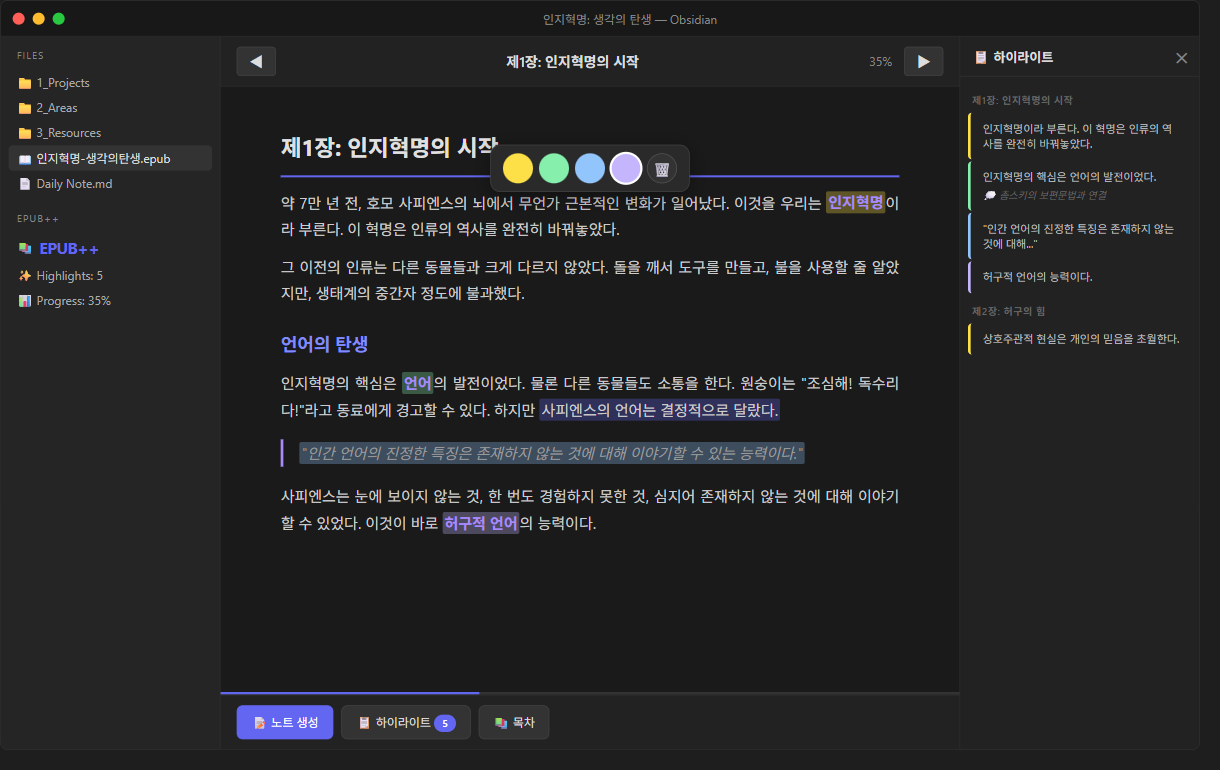
EPUB++ is a complete reading workflow inside Obsidian:
- Drop an
.epubinto your vault — click to open - Read with full navigation — paginated view, TOC sidebar, progress bar
- Highlight text — select and choose from customizable colors
- One-click note generation — highlights → structured markdown with chapter grouping, source links, and proper frontmatter
Key Technical Decisions
| Decision | Why |
|---|---|
TextFileView over ItemView | Obsidian’s file lifecycle hooks (onLoadFile) are needed for .epub extension registration |
| JSON sidecar storage | Never modifies the original EPUB; highlights persist as book.epub.highlights.json |
| epub.js (CFI positioning) | Only JS library with browser rendering + annotation API; CFI strings survive re-pagination |
| Customizable colors | Settings tab with color picker, add/remove, labels — not hardcoded |
Architecture
EPUB file → vault.readBinary() → epub.js Book
  → renderTo(iframe) → user selects text
  → "selected" event → CFI range + text captured
  → JSON sidecar saved → highlight restored on reopen
  → "Generate Note" → chapters grouped → MD file created
The “Aha” Moment
The same workflow that made PDF annotation plugins successful was missing for EPUBs. PDF has 12+ Obsidian plugins. EPUB had zero that did highlight-to-note properly. Sometimes the best product idea is: “X worked great for A. Nobody’s done it for B yet.”