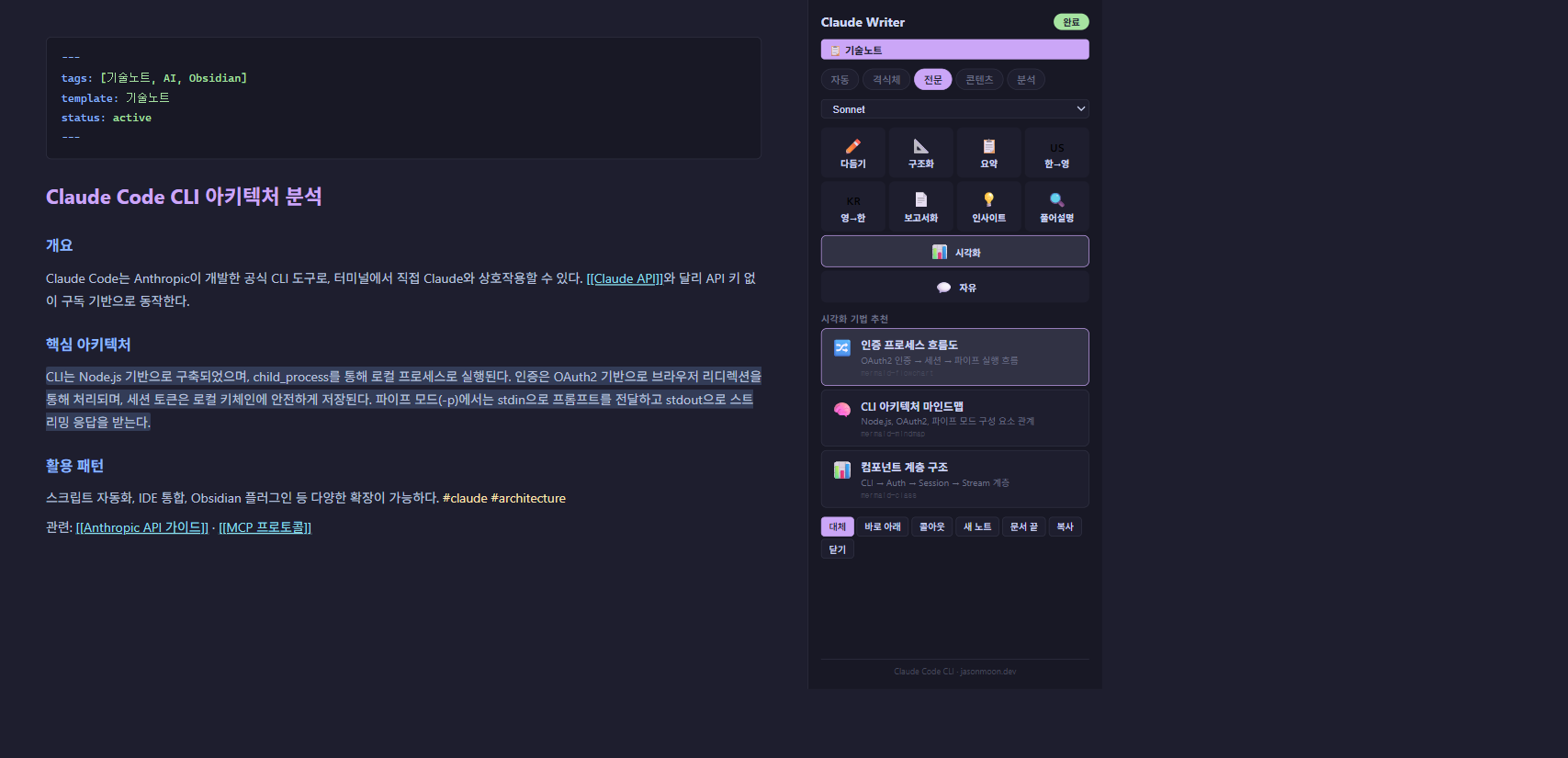
Claude Writer
What if your note-taking app could think? I built an AI writing assistant that lives inside Obsidian's sidebar.
Obsidian plugin that transforms your notes with Claude AI — rewrite, restructure, translate, explain at 4 depth levels, and auto-generate Mermaid visualizations. All powered by Claude Code CLI.
The Problem
I write everything in Obsidian — meeting notes, technical docs, project plans, daily journals. But switching to Claude’s web UI to polish text, translate reports, or explain concepts broke my flow. Copy text out, prompt Claude, copy result back, paste, format. Every. Single. Time.
I needed Claude inside Obsidian. Not as a chatbot sidebar, but as a surgical writing tool — select text, pick an action, get the result exactly where I need it.
What I Built
A sidebar plugin with 10 commands that understand your document’s context:
- Writing tools — Rewrite, Restructure, Summarize, KR→EN, EN→KR, Formalize to English report
- Thinking tools — Insight extraction (Zettelkasten style), Explain at 4 levels (elementary → expert)
- Visual tools — AI analyzes your text, recommends 3 visualization techniques, generates Mermaid diagrams
- Custom — Free-form instructions for anything else
The key insight: context matters. Every command sends 500 characters before and after your selection, plus scans [[wikilinks]] up to 3 levels deep. The AI doesn’t just process isolated text — it understands where your selection sits in the document and the broader knowledge graph.
Technical Architecture
The plugin bridges Obsidian and Claude Code CLI via child_process.spawn. No API keys needed — it uses your existing Claude subscription directly through the official CLI.
Template-aware processing: The plugin reads your note’s frontmatter template: field and auto-switches prompts. A meeting note gets formal Korean business style. A tech note gets bilingual terminology. A content plan gets hook-first structure. 11 templates, each with optimized prompts and model selection.
Visualize is a 2-step pipeline: Step 1 uses Haiku (fast) to analyze content and suggest 3 visualization types as structured JSON. Step 2 uses your selected model to generate the actual Mermaid code. The result renders natively in Obsidian.
6 insert modes: Replace selection, insert below, wrap in foldable callout (> [!info]-), create a new linked note with [[wikilink]], append to document end, or just copy.
Key Features
- 10 writing commands with right-click context menu integration
- 4-level Explain mode — from elementary school analogies to expert-level technical analysis
- Mermaid visualization — flowcharts, mindmaps, timelines, ER diagrams, and more
- Template detection — 11 document templates with auto-optimized prompts
- 3-depth wikilink context — scans linked notes for richer AI understanding
- Streaming output — see results as they generate, cancel anytime
- Zero data storage — everything stays between your machine and Anthropic’s API
What Makes It Different
Most AI plugins for note-taking apps are chat interfaces. You type a prompt, get a response, copy-paste it somewhere. Claude Writer is a surgical tool — it operates on your selected text, considers the surrounding context, and gives you precise control over how the result enters your document.
The Explain mode turns any concept into a depth-appropriate lesson. Select a technical term in your notes, pick Level 1, and get an elementary-school explanation with analogies. Pick Level 4, and get expert analysis with trade-offs and English terminology. Same text, four different depths of understanding.
Install Now via BRAT
Claude Writer is available today through BRAT (Beta Reviewers Auto-update Tester):
- Install the BRAT plugin in Obsidian
- Open BRAT settings → “Add Beta Plugin”
- Enter:
Jason198341/obsidian-claude-writer - Enable Claude Writer in Community Plugins
Requires Claude Code CLI installed and authenticated (claude auth login).
Community plugin marketplace submission is also pending review.